


How to Check FASTag Transaction History Online: Step-by-Step Guide
16 October,2026
Updated:16 October,2026
0 min read

share


Copied
 38
38This blog shares step-by-step instructions for getting a FASTag statement online.
FASTag is one of the best innovations for regular highway users in India. Not only does it make toll payments hassle-free and instant, but it also creates a digital record of every payment so you can review it later. It’s particularly beneficial for fleet owners engaged in frequent intercity or interstate travel.
If you want to see how much you’ve paid in tolls over a particular week, month, or year, you can check your FASTag transaction history. We’ve shared the steps to check FASTag history online for your convenience.
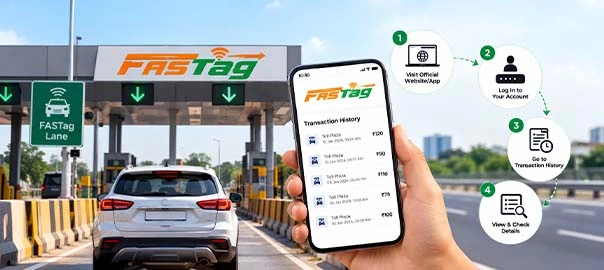
Why Should You Check Your FASTag Transactions?
A FASTag transaction is only initiated when you’re crossing a FASTag-enabled toll plaza on highways. Hence, some people may wonder about the relevance of checking FASTag transactions later. Checking these transactions is generally recommended for the following reasons –
● Keep Track of Your Highway Expenses
Routine checking of your FASTag transaction details can help you monitor your travel-related expenses, particularly the toll paid on highways. You can use it to better understand your travel history, frequently used routes, and adjust travel plans to avoid unnecessary toll expenses.
● Identify Incorrect Toll Deductions
Although FASTag payments are automatic, their digital nature doesn’t eliminate the probability of errors. In some cases, a user may be charged double deductions or an incorrect toll amount due to a possible system error.
Routine monitoring of FASTag statements can help you identify wrong deductions early, so you can raise disputes at the right time.
● Monitor Your FASTag Balance & Recharges
Assessing FASTag statements online won’t just help you keep track of toll deductions. Your account history can also help you track recharges, so you can understand how you use your balance. Yearly statements can show recharge patterns, making it easier to determine an ideal recharge frequency.
How to Check FASTag Transactions History Online: Step-by-Step Process
The steps to check FASTag transaction history vary by issuing platform. If your FASTag issuing authority is a bank, then you can use the following steps:
- Visit your bank’s official website.
- Log in to the portal using the user ID and password you were provided or have created.
- Once logged in, navigate to the FASTag menu.
- Look for transaction history/transaction details/statements under the FASTag menu. The name may vary from one portal to another, so it’s best to look for options that are indicative of FASTag records.
- Choose the duration (a specific date, week, month, or year) for which you want FASTag transaction details, then click on Proceed/Submit. In some cases, the details may get displayed automatically once you choose the desired period.
Disclaimer: Steps may vary due to differences in the issuing authority’s portal design. So, visit your issuing authority’s website and review the exact steps for checking your FASTag transaction history.
What Details Are Shown in a FASTag Statement?
Online FASTag statements don’t simply mention the toll payments deducted over a period. You can also find the following details in addition to the toll amount deducted from your wallet/account -
- Transaction date
- Name of the toll plaza
- Transaction type/status
- Transaction time
- FASTag account/wallet balance after the toll deduction
- Recharge transactions
- Transaction or reference IDs
- Vehicle details, including the vehicle’s registration number and vehicle class
How to Identify an Incorrect FASTag Transaction
When reviewing your FASTag transaction history online, check if each entry is correct. The following points can help you quickly identify an incorrect transaction.
● Check Whether You Actually Travelled Through the Listed Toll Plaza
A FASTag statement doesn’t just list the toll amount; it also displays the toll plaza where the amount was deducted. If your car wasn’t near that plaza when the toll was deducted, the transaction deserves deeper investigation. You can also raise a complaint with the issuing authority.
● Compare the Amount Deducted with the Applicable Toll Fee
Always check whether the amount charged matches the applicable toll for your vehicle class and journey. If the FASTag system is experiencing a glitch, then a wrongful charge is probable. A thorough check can help you identify incorrect toll deductions (if any).
● Look for Duplicate Deductions
If the same toll plaza and toll amount appear within a relatively short timeframe in your FASTag transaction history, it’s worth checking both entries. Occasionally, the toll amount can be deducted twice, sharply increasing your expenses. You should immediately raise complaints for duplicate transactions.
Tips to Keep Track of Your FASTag Balance and Transactions
Frequent highway users should make it a habit to check their FASTag transaction details bi-monthly or weekly, depending on how often they use highways. It’s an excellent way to remain aware of your FASTag balance and transactions. Here are a few practical tips to make it easier.
● Pay Attention to Every Transaction Alert
If you have linked your active mobile number with the FASTag account, you’ll receive an SMS alert after every toll deduction. Checking the SMS instantly can keep you informed of the deducted amount and other transaction details.
● Review the FASTag Statement After Longer Trips
People who have recently finished their multi-day road trip across cities or states should check their FASTag statement.
Review each entry and compare it with the toll plazas you crossed, the applicable toll amount, and the transaction date & time. It will help you identify any wrongful charge, so you can raise a complaint early.
● Routine Monitoring is Ideal
Whether you’ve travelled regularly or occasionally, it’s best to assess and review FASTag records monthly. It will keep you updated on toll-related expenses, facilitating better financial management.
Conclusion
FASTag users enjoy greater convenience at toll plazas because payments are almost instantaneous, enabling faster vehicle movement. However, you shouldn’t let these payments remain invisible. Regardless of how often you travel by highway, make it a routine to review your FASTag transaction history every month.
This is necessary if you want to stay informed about every expense from your account. Besides being mindful of your finances, if you also want to remain accountable for your car’s financial security, then protect it under the correct car insurance with adequate coverage.
You can explore the Comprehensive Car Insurance at Shriram General Insurance if enhanced coverage and ample personalisation options are your priority.
FAQs
Does every car owner have to pay toll charges?
Yes, car owners must pay toll charges when using Indian highways for travel.
Can I check my FASTag transactions history online?
Yes, you can. Visit your issuing partner’s website and log in with your credentials. You can then navigate to the FASTag menu to explore transaction details.
What information can I get in my FASTag statement?
You can find numerous pieces of information, including the toll amount, date & time of deduction, toll plaza’s code/name, and vehicle details.
How do I handle double deductions at a toll plaza?
If you’ve been charged twice for the same trip, then you can raise a complaint with the FASTag issuing authority. They’ll investigate the entry and issue a refund (if applicable).
Do Indian banks issue FASTag?
Yes, some Indian banks issue FASTag. You can browse bank websites to identify which ones provide FASTag service.