

Wireless Apple CarPlay and Android Auto Adapters: Complete 2026 Buying Guide
26 February,2026
Updated:13 April,2026
0 min read

share


Copied
 6100
6100This is your introductory guide to wireless CarPlay and Android Auto wireless adapters.
Apple CarPlay and Android Auto are unarguably the best integrations that can bring calling, maps, entertainment, and other crucial features from your smartphone into your car’s infotainment screen. You can use it to make your driving more convenient and guided.
The only challenge with these systems is that they’re wired in many cars. If you own a compact or sub-compact four-wheeler, these wired systems can make your cabin feel more cluttered and unsafe. However, you can prevent such challenges by using wireless CarPlay adapters. This blog covers how.
What Is A CarPlay Adapter And Why Is It Important?
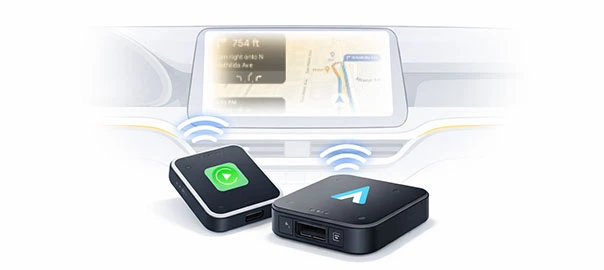
A CarPlay adapter is a compact plug-and-play dongle that converts an existing wired Apple CarPlay or Android Auto connection in your car into a wireless one. You can plug it into the same USB port that you use to establish a wired connection. Once plugged, the wireless CarPlay adapter pairs with your smartphone via Bluetooth.
It then uses Wi-Fi to enable high-speed data transfer, wirelessly displaying your phone’s interface on the car’s infotainment screen. This adapter is crucial for Indian vehicle owners because numerous mid-range cars, including those from Hyundai, Kia, Tata, and Mahindra, support wired CarPlay.
Wireless functionality is reserved for more premium models. Replacing the head unit to gain a factory-installed wireless system can cost several thousand rupees. A wireless CarPlay adapter provides the same functionality at a fraction of the cost.
Best CarPlay Wireless Adapters to Modernise Your Car
The Indian market is filled with premium yet affordable options that every car owner can consider. If you’re overwhelmed by choices and cannot decide which adapter to purchase, you may explore our picks for the best wireless CarPlay adapters in 2026.
| Best Wireless CarPlay Adapters 2026 | Key Highlights | Price |
| OTTOCAST Mini Wireless Adapter |
|
₹ 4,100 |
| Tune Lite Adapter by Portronics |
|
₹ 1,699 |
| TechAdro 2-in-1 Wireless Adapter |
|
₹ 2,999 |
| Lifelong 2-in-1 Wireless Adapter |
|
₹ 1,879 |
How Wireless CarPlay Upgrades Your Car
Purchasing a CarPlay wireless adapter is the easiest, most cost-effective way to upgrade your car. Once you switch from wired to wireless CarPlay via adapters, you’ll instantly benefit from the following upgrades.
Completely Cable-Free Convenience
Wireless CarPlay gives you the same functions and features as a wired connection. It keeps your cabin clutter-free, giving it a clean, premium look.Seamless Navigation on Bigger Screen
With a CarPlay wireless adapter, you can use navigation apps, such as Apple Maps, Google Maps, Waze, etc., directly on your car’s large infotainment screen. Hence, you receive clearer directions and real-time traffic updates in an easier-to-read interface. It not only makes driving distraction-free but also enhances your car’s perceived value.Safer Hands-Free Control
The best wireless CarPlay adapters in 2026 are usually voice-controlled. Hence, you can call, text, set routes, and even play your favourite music by a single voice command. This hands-free control minimises distractions, helping you focus on driving.Enhanced Infotainment Experience
If you like to drive while listening to music, podcasts, or audiobooks, then 2-in-1 CarPlay + Android Auto wireless adapters can play the same with better sound integration through your car’s speakers. It essentially turns your standard audio system into a smart entertainment hub.Modern, Premium Feel
Wireless CarPlay adapters give older and mid-range cars a tech upgrade similar to newer, premium models. The clean dashboard setup, automatic pairing, and responsive interface instantly make the car feel more premium and advanced.Check with Wireless CarPlay vs Wired CarPlay Systems
People planning to purchase an adapter must first evaluate the wireless CarPlay vs wired CarPlay options. It will help in making an informed choice. Here’s a quick overview of both.
| Basis of Differentiation | Wireless CarPlay | Wired CarPlay |
| Connection Method | Uses Wi-Fi + Bluetooth for pairing | Uses a physical USB connection (cable or dongle that requires a USB) |
| Setup Experience | Instantly pairs once configured; some wireless adapters provide automatic connection | You must connect the cable every time for usage |
| Speed & Responsiveness | May experience slight lag of a few seconds, but it’s generally fast and smooth | Extremely stable and consistent with almost zero lag |
| Signal Stability | Stability depends on adapter quality and Wi-Fi signal. Premium adapters are mostly stable; cheaper ones may occasionally lag or disconnect | Extremely stable due to the physical wired link. Very low chances of signal interruption |
| User Convenience | Superior; cable-free instant connection creating a cleaner cabin | Slightly inconvenient; may make cabin feel cluttered due to cables |
| Audio & Map Latency | Slight latency is possible | Near-zero latency |
| Cost | A few thousand rupees, depending on the adapter you choose | No extra cost if car already has wired CarPlay |
Technical Specifications of Android Auto Wireless Adapter
The precise technical specifications of Android Auto wireless adapters may vary from one product to another, but the following specifications are common across many products.
Connectivity Standards
Wireless Android Auto adapters use Bluetooth to initiate the connection between your phone and the car’s Android Auto system.After pairing, Wi-Fi carries the higher-bandwidth data needed for Android Auto’s user interface, audio, maps, and app streaming. Bluetooth handles the setup, and Wi-Fi handles the heavy lifting for smooth screen projection.
Wi-Fi Band and Speed Support
Most adapters support 5 GHz Wi-Fi, which provides faster data throughput and less interference than 2.4 GHz bands. This higher-speed wireless link is essential because Android Auto mirrors navigation and app interfaces over the network in real time. Lower speeds may cause lag or stutter.Bluetooth Version
Quality adapters usually support Bluetooth v5.0. It provides improved pairing stability and better range. It also facilitates more reliable discovery between the phone and the adapter.USB Interface Type
The adapter’s USB interface defines how it plugs into your car’s USB port. USB-C is increasingly common, and supports modern data and power standards. USB-A is more common in older cars. This USB connection is compulsory because it powers and provides data to the adapter before it switches to wireless.Compatibility Requirements
An Android Auto wireless adapter generally requires the following two things:- A car infotainment system with wired Android Auto support
- A phone with Android 11 or higher to support the wireless protocol
Key Factors to Evaluate When Choosing the Fastest Wireless CarPlay Adapter
Choosing the fastest wireless CarPlay adapter is the best decision you can make. If you’re unsure how to choose one, use the following factors to make a purchase decision.
Startup Time
You must find out how quickly the adapter connects after you start the car. While a few seconds’ lag, such as 10 to 15 seconds, may be considered unproblematic, anything higher should be avoided.Connection Stability
Speed isn’t just about a fast connection, but also about consistency. Hence, you should explore options that don’t disconnect frequently while driving. Frequent drops, audio cuts, and frozen screens can make even the fastest adapter frustrating to use.Real-World Reviews
Checking wireless CarPlay adapter reviews is the easiest way to get unbiased opinions on your shortlisted options. If the reviews feature words like ‘no lag’ and ‘instant pairing,’ consider it a good option.Compatibility with Your Car Model
It’s the most crucial factor that deserves your attention. Before you purchase any wireless adapter, always confirm whether it’s fully compatible with your car’s wired CarPlay system. Poor compatibility may cause delays, even if the adapter itself is technically fast.Brand Support & Updates
Choose a brand that provides firmware updates. It will ensure you always receive improved connection speed and reduced lag. Cheap adapters without brand support may become slow and unusable over time.How to Effortlessly Set Up a Wireless Android Auto Adapter
Before purchasing an Android Auto wireless adapter, ensure that your car supports wired Android Auto. An adapter won’t work if a car doesn’t have a built-in Android Auto. If your vehicle has one, follow the steps below to set up a wireless adapter.
- Plug the newly purchased adapter into the car’s USB port
- Enable your phone’s Bluetooth and Wi-Fi for instant pairing
- Accept the pairing request displaying on both your phone and the car’s screen
- Approve Android Auto permissions
- Wait for the first-time setup to complete, which may take slightly longer for system configuration
- Test navigation and audio to ensure the pairing is successful
Wireless CarPlay Adapter Benefits
Having a CarPlay wireless adapter has numerous benefits. We’ve covered the key benefits for your reference.
No More Plugging Cables
With a wireless CarPlay adapter, you don’t have to reconnect your phone with a cable every time. After the initial pairing, it will connect automatically, eliminating frustration and time wastage.Cleaner, Clutter-Free Dashboard
Since wireless adapters don’t require cables, your cabin stays cleaner and clutter-free. The interiors suddenly start looking more premium and organised.Instant Access to Navigation
If you frequently travel on newer routes, the instant access to navigation apps on your car’s infotainment screen can make driving a breeze.Enhanced Safety
Most top CarPlay wireless adapters support voice control. It makes it easier for drivers to stay focused while using navigation, music, and other features.Final Thoughts
Cars with built-in wired CarPlay and Android Auto systems can benefit significantly from these wireless adapters. They don’t just give the car a premium feel and functionality, but they also enhance the driving experience.
If you don’t want your car cabin to become cluttered with cables or you want to avoid the inconvenience of physically pairing your phone via cables, you must invest in the best wireless CarPlay adapters in 2026.
You should also consider enhancing your car’s financial security by insuring it with a reliable Car Insurance policy. Explore Shriram Car Insurance plans if you want policies that blend affordability with enhanced coverage.
FAQs
1. Are wireless CarPlay and Android Auto adapters expensive?
While the top adapters are usually expensive, you can find really good options in the ₹ 1,500 to ₹ 4,500 range.
2. Can I connect CarPlay wireless adapters to any car?
These adapters will only connect if a car has a built-in CarPlay (or Android Auto) system.
3. Can a beginner use CarPlay wireless adapters?
Yes, beginners can easily use these adapters. Simply follow the instructions displayed in the product manual to easily use these simple plug-and-play devices.
4. What are some good wireless CarPlay adapters for Indian cars?
While you can find numerous options, you may start your search from brands such as Lifelong, Portronics, and OTTOCAST.
5. How long does it take to connect the wireless CarPlay adapter to the car’s built-in system?
The initial configuration may take between half a minute and one minute for good-quality adapters. After the initial pairing, future connections may take less than 10 seconds.